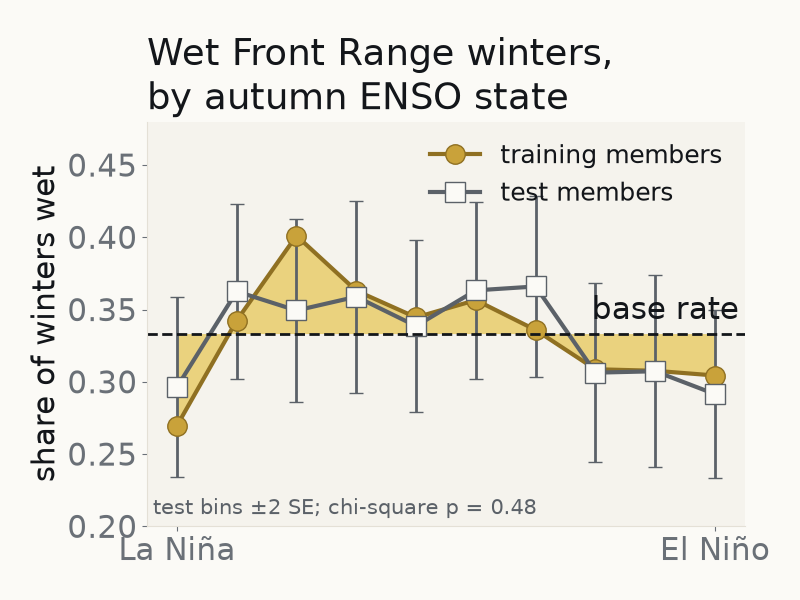

This Project Pythia Cookbook covers supervised machine learning readiness on a climate-model large ensemble: one classification question — does the autumn ENSO state predict a wet Front Range winter? — answered on NSF NCAR’s own CESM2 Large Ensemble (the AWS Open Data copy; no account needed), walked along the analysis spine of NSF Unidata’s Supervised Machine Learning Readiness, in seven short chapters.
This cookbook is for Earth system scientists, engineers and software staff who know Python (at the level of the Xarray tutorial) and want to evaluate a machine-learning model honestly. Chapters 1–4 are the path for someone new to machine learning; chapters 5–7 add the evaluation depth: paired tests, a held-out test, and an out-of-period test. The seven chapters take about 1 hour 45 minutes, and each runs on its own in under a minute from a committed table.
Motivation
The closest neighbour, in the ProjectPythia organisation though not yet listed in the gallery, is the Precipitation Machine Learning Cookbook, a short scikit-learn introduction (a regression of dew point on temperature, pressure and wind) that accompanies Unidata’s CyberTraining. The CESM LENS on AWS Cookbook covers reading and plotting the CESM1 Large Ensemble (reproducing the key figures of Kay et al. 2015), and the scikit-learn Argo (also not yet listed), Landsat ML, xbatcher ML and EO Data Science cookbooks apply machine learning to other data. None yet walks a newcomer through a supervised classifier on a large ensemble, where the members themselves are the unit the split has to respect.
So this cookbook changes one of Unidata’s steps on purpose, and adds to two others: the split is by ensemble member, and the forced response and the wet threshold are fit on training members only. Chapter 3 measures what a member-blind split or a transform fitted before the split would do to the score, rather than assuming it. Refinements are promoted on a paired test with a corrected standard error, and the result is always read against the base rate of the same winters.
By the end you will be able to:
explain the steps of a supervised analysis (framing → data → split → train → validate → refine → test → justify) and name the failure each step guards against;
build and validate a classification model on a climate-model ensemble, reporting precision, recall and a confusion matrix;
compare refinement trials as a paired test across runs, so a gap inside the run-to-run spread is not read as a difference;
justify the chosen model honestly on measured performance and cost, including when nothing beats the base rate.
Authors
Contributors
See the contributors graph.
The analysis spine follows NSF Unidata’s Supervised Machine Learning Readiness (Apache-2.0, NSF award #2319979),
authored by NSF Unidata in partnership with Metropolitan State University of Denver (per the Unidata course page). The paired-test functions in notebooks/lensml.py adapt
scikit-learn’s “Statistical comparison of models using grid search” example (BSD-3-Clause), credited in place.
Structure
Seven chapters, each a notebook that runs on its own in a fresh kernel. Shared code lives in one file, notebooks/lensml.py, which
prints a function’s source where a chapter introduces it.
| Chapter | What it does |
|---|---|
| 01 Finding the data | the question as a decision; the intake-esm catalogue on AWS; the committed table |
| 02 The target and the forced response | the forced response removed on training members only; one pooled “wet” threshold |
| 03 Splitting by ensemble member | member-grouped folds; one model scored three ways to measure two leaks |
| 04 Baselines and the ladder | three rules that fit nothing, then logistic, tree and boosting against the base rate |
| 05 Refinement trials | the register, the corrected paired t-test, the Bonferroni line, a trial of your own |
| 06 The held-out test, and the justification | the test, read against no skill and the cost of a false alarm; the limits |
| 07 An out-of-period test | the same members’ SSP3-7.0 winters, scored once under a protocol fixed before the run (self-attested) |
Chapters 1–6 carry short Try it prompts; none needs anything outside this repository. The terms are defined in the
glossary. Each figure is shown with show_fig(fig, alt) from lensml.py, which gives the rendered image a
descriptive alt text; thumbnails/make_thumbnail.py redraws the gallery thumbnail from the committed table.
What it finds
The signal is weak. The straight-line relation between autumn Niño 3.4 and winter precipitation is indistinguishable from zero. The final model,
gradient boosting at the base-rate threshold, shows a small precision edge on the held-out members, but that test is not blind: the same 20 members were scored during development, with four models, and the final model was registered after those
scores had been seen. Chapter 7 tests the edge on those members’ untouched SSP3-7.0 winters (2016–2100), under
a protocol written before that data was read (self-attested; it ships as notebooks/data/ssp370-test-protocol.md). The edge is not
confirmed: it does not replicate under the rule fixed before the run, but the test was small. A true edge of chapter 6’s size would
have cleared it only about 42% of the time (chapter 7 prints this), so the result neither confirms nor rules out an edge of that size in CESM2’s
SSP3-7.0 winters (the interval holds both 0 and chapter 6’s +0.018). Chapter 6 states the limits: a
model-world study, on a ~1° grid, of total precipitation, in DJF, for a box that crosses the Divide.
As optional further material, ncar
Data
notebooks/data/member_winters.csv is the full member-winter table (every member of the ensemble, historical experiment), derived by
the cookbook’s own code and committed, so no chapter needs the heavy S3 read; chapter 1 still opens the catalogue and one store on AWS. Every chapter checks its header against the parameters in
notebooks/lensml.py, and chapter 1 can re-derive it from S3 (REBUILD = True; about half an hour on a fast link). Chapter 7 alone reads
member_winters_ssp370.csv, the same members’ SSP3-7.0 winters. See notebooks/data/README.md.
Data citation
Community Earth System Model v2 Large Ensemble (CESM2 LENS) was accessed on 2026-10-20 (historical) and 2026-10-29 (SSP3-7.0) from
https://
Grover, M., & Banihirwe, A. (2021). NCAR CESM2 Large Ensemble Cloud-Optimized Dataset. NSF NCAR CISL. doi:10.26024/y48t-q717
Rodgers, K. B. et al. (2021). Ubiquity of human-induced changes in climate variability. Earth System Dynamics 12, 1393–1411. doi:10.5194/esd-12-1393-2021
Results based on the CESM2 Large Ensemble acknowledge the CESM2 Large Ensemble Community Project and supercomputing resources provided by the IBS Center for Climate Physics in South Korea. The dataset citation and access line sit under every chapter figure that draws CESM2 LENS data (not the gallery thumbnail).
Running the Notebooks
You can either run the notebooks in the Cookbook using Binder or on your local machine.
Running on Binder
Until this cookbook is transferred to the ProjectPythia organisation, use https://mybinder.org wherever the steps below say
https://binder.projectpythia.org; the Pythia Binder refused to launch this repository when it was tried on 2026-10-30.
The simplest way to interact with a Jupyter Notebook is through
Binder, which enables “one click”
execution in the cloud. Simply navigate your mouse to
the top right corner of the book chapter you are viewing and click
on the rocket ship icon (see screenshots here),
and a text box will appear. Type or paste the Pythia Binder link
(https://binder.projectpythia.org) and click “Launch”.
After a few moments you should be presented with a
notebook that you can interact with. You’ll be able to execute code
and even change the example programs. At first the code cells
have no output, until you execute them by pressing
Shift+Enter. Complete details on how to interact with
a live Jupyter notebook are described in the Pythia Foundations chapter Getting Started with
Jupyter.
Note, not all Cookbook chapters are executable. If you do not see the rocket ship icon, such as on this page, you are not viewing an executable book chapter.
Running on Your Own Machine
If you are interested in running this material locally on your computer, you will need to follow this workflow:
Clone the
https://github.com/glenbuchanan/cesm2-lens-ml-readiness-cookbookrepository:git clone https://github.com/glenbuchanan/cesm2-lens-ml-readiness-cookbook.gitMove into the
cesm2-lens-ml-readiness-cookbookdirectorycd cesm2-lens-ml-readiness-cookbookCreate and activate your conda environment from the
environment.ymlfileconda env create -f environment.yml conda activate cesm2-lens-ml-readiness-cookbook-devMove into the
notebooksdirectory and start up Jupyterlabcd notebooks/ jupyter lab
Running on the NSF NCAR JupyterHub
On the NSF NCAR JupyterHub (Casper/Derecho) create the same environment from environment.yml and pick the kernel it registers;
the chapters read the AWS copy of the ensemble, so no GLADE path is needed.
Licence, provenance and review status
Code is Apache-2.0; non-code content is CC BY 4.0 (the Project Pythia split). Data are under the UCAR Data Terms of Use (CC BY 4.0).
Funding: self-funded. This cookbook has not been reviewed or sponsored by NSF NCAR or NSF Unidata. The NSF grant line in the site footer is Project Pythia’s acknowledgement of its own funding, shared by every Pythia cookbook; this cookbook received none.
Drafting: Drafted with AI assistance (Anthropic’s Claude) from cited sources, under the author’s direction, and reviewed by the author in several full read-throughs. Text and code were checked against those sources and the notebooks’ own outputs by the author’s automated checks (not in this repository) and by separate AI review sessions (also Claude); no human subject-matter expert has reviewed it yet.
How it was checked: each chapter’s Resources and references table lists its sources; the publish workflow re-executes every chapter on every build. The author’s own checks (not in this repository) compared printed numbers with the prose, and AI review findings were acted on only once reproduced.